Meet Specio: every animal in your photos, named
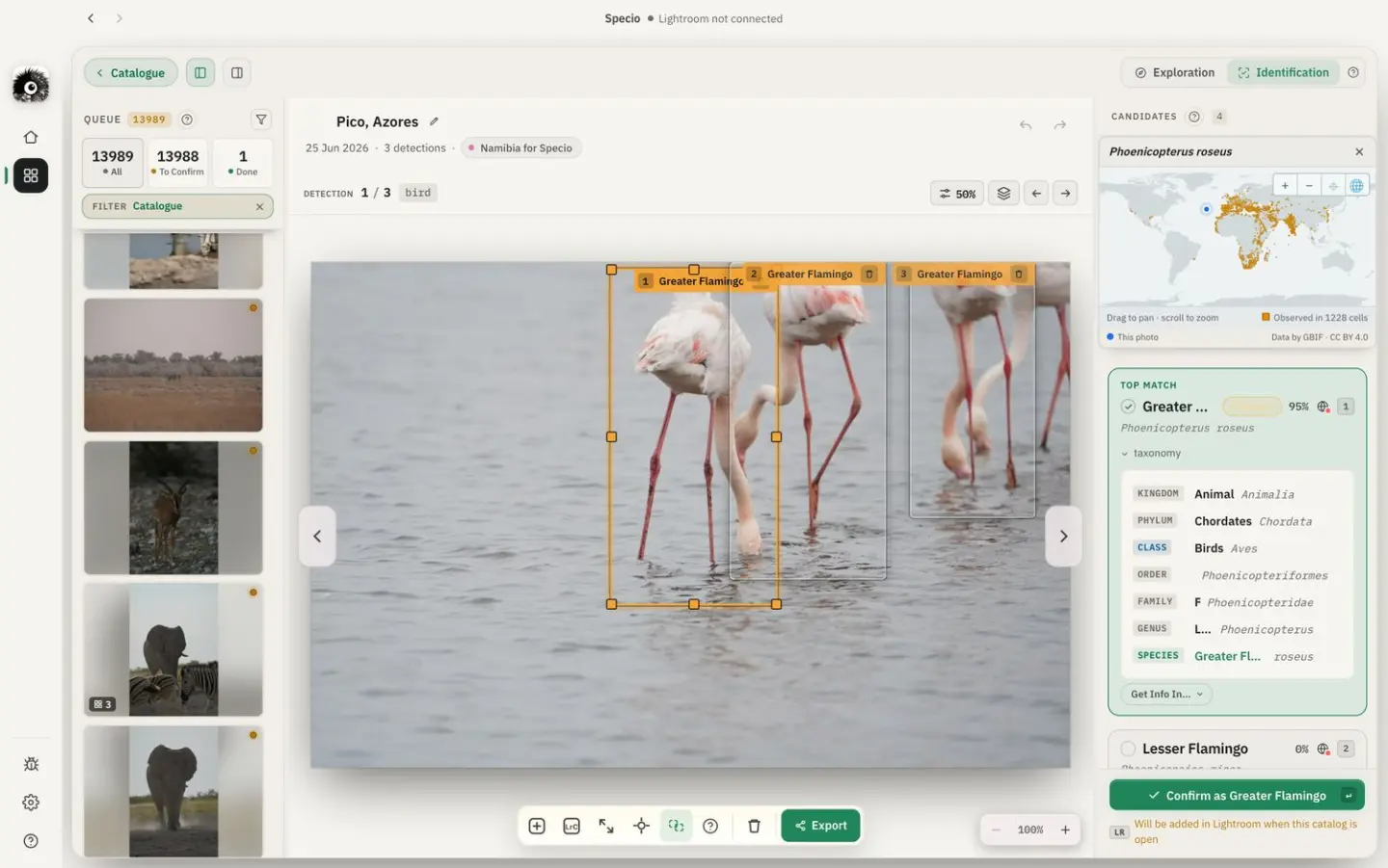
You remember the moment, the light, the wait. The name of the bird on the third branch, less so. Specio looks at your wildlife photos, finds every animal in them and tells you which species it is, then writes that name into your library so you can find it again in seconds. Here is what it does, and why we built it.
Why we built Specio
Wildlife photographers come home with thousands of frames, and the naming always comes last. It means field guides, forums, half-remembered calls, and keywords typed one photo at a time. Most catalogues end up with a folder called "Birds 2024" and very little inside the metadata. We wanted the naming to happen on its own, while you get on with the photography.
What Specio does
Specio works in three steps.
1. It finds the animals. Specio scans each photo and frames every animal it sees, even when the subject is small in the frame or partly hidden behind a branch.
2. It names them. Each animal is compared against a reference of hundreds of thousands of species, from the robin in your garden to the reef fish on your last dive. You get the species name, its full classification, and a link to reference pages such as Wikipedia, iNaturalist or eBird to check it.
3. It writes it back. Once you have confirmed an identification, Specio writes the species into your photos as keywords: the common name in the language you choose, plus the scientific hierarchy from kingdom to species. Search "kingfisher" or "Alcedinidae" in your library, and the photos are there.
Built for Lightroom Classic, and beyond
Specio comes with a Lightroom Classic plug-in: select photos in Lightroom, send them to Specio, and the keywords come back into your catalogue. It handles several catalogues, including ones that are not open at the moment, and keeps the keywords waiting until you open them.
Not on Lightroom? Specio also works with plain folders of photos (JPEG, RAW, HEIC, PSD) and, on Mac, with your Apple Photos library.
Your photos stay on your computer
Specio runs on your Mac or PC. The detection and identification happen on your machine, using its own processor, so your photos are never uploaded anywhere to be analysed. It also means Specio keeps working in the field, on a laptop, without a connection.
More than a tagging tool
Once your photos are named, Specio shows you what you have actually photographed: how many species, where, and when. A map places your sightings around the world, and the Tree of Life lays out every species you have captured, branch by branch, from kingdoms down to species. Many of us discovered species in our own catalogues that we had never noticed.
Five families, your choice
Specio is organised around five families of wildlife:
- Birds (11,000+ species)
- Mammals (6,500+ species)
- Reptiles & Amphibians (18,000+ species)
- Marine Wildlife (32,000+ species)
- Insects & Arachnids (1,000,000+ species)
You unlock only the families you photograph, or all five at once.
What's next
This is our first post, and Specio is still young. It is shaped every week by the photographers who test it, and many of the features above started as one of their emails. If you photograph wildlife, we would love to hear what you would like Specio to recognise, and what it gets wrong. Try it on your own photos, and tell us.